Chibi Pixel Oekaki FAQ
Official site resource (Tutorials)
Back to Chibi Pixel Oekaki or Back to Tutorials
Okay, so no-one has asked anything yet. Still I thought this would be useful XP Also, ask away if you have any questions!
What's oekaki?
It's a Japanese invention where a bunch of people doodle together on a message board.
The oekaki is being blocked by my computer/browser! Does it contain a virus?
No, this is because the oekaki is an old Java program and recently those have been tagged as suspicious by Microsoft and Google. If you want to run it you still can, but first you might need to add chibidoll.com to your safe list at the 'Security' tab of 'Configure Java' at the Control Panel on your computer first. A browser we know still supports the oekaki program is Firefox.
What do I do when I'm done with my picture?
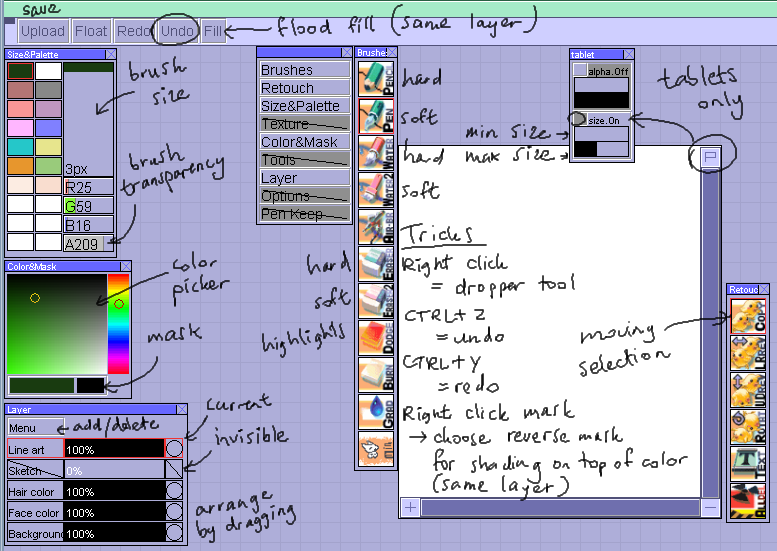
Hit the Upload button in the upper left.
Why has my picture gotten all small?
Two possible reasons: either it's an older picture or a mod did it most likely due to lack of quality or inappropriate content, indicating it will eventually be hidden from view completely.
Will my picture always stay up?
If it isn't a doll item, most likely not. We don't have a lot of server space available so be sure to save your own copy!
How can these other people draw so quickly?
They are most likely using a graphic tablet and the JTablet plugin.
Will the item I drew automatically qualify for the site?
No, it still has to be pixel art of decent quality. Hint: Only use the pencil brush! We're still working on a way to submit items from the oekaki directly.
What am I supposed to do with the doll at the bottom when I go to draw in freestyle mode?
You can use it to insert your doll into your picture. That way you could put together a little comic or something. If you change clothes in another tab you can have multiple outfits in it as well.
How am I supposed to start off when I go to draw in item mode?
First, press the button right below the drawing program. It will insert a doll base. Then draw your item on a layer above the doll base.
What's a layer?
They're like transparent sheets you can put on top of each other. Wise artists use different layers for their sketch, line art, coloring etc.
I want to make my animation into a little story instead of just drawing a picture...
By all means do! XD
My oekaki page is black! What's wrong?
This is most likely because your Java applet needs to be updated. Visit the official Java site and find the version for your operating system to update.
How do I get the special tablet pressure sensitivity tools?
First choose 'Get Tablet Plugin' from the menu. Install the plugin. Then you may have to restart your browser. Start your drawing. First select the brush you want to use, then open the tablet menu by clicking "P" in the top right of the canvas, and play around with the brush size. Once I close this menu I can't open it anymore, so choose your settings carefully.
Wiki title:Chibi Pixel Oekaki FAQ
Last changed:February 28, 2016 by Karin
Author(s):Karin
Page views:19
Visible to:anyone
Can be edited by:authors only
I'm usually comfortable with my paint programme.
If so, how do you upload?
however
im pretty sure we dont have an upload thing for this oekaki
The .pch files can be played by... Shi Painter? XD
I'd still save it because it contains all your animation/layer info. You'd always have to upload it to a Shi Painter board to view though. (I dunno maybe we could offer that feature in the future)
Its hard for me to do it because mine tablet is all in Chinise and its hard for me to read it even though i am Chinise xP